Family Details
The Family Details section in VoxHRM allows employees or administrators to record dependent and non-dependent family members.
This section supports:
- Dependent tracking
- Insurance eligibility
- Tax declaration
- HR records
- Emergency documentation
Multiple family members can be added.
Section Structure
Each family member record includes:
- Basic Information
- Contact Information
- Personal Information
- Relationship Details
- Dependency Status
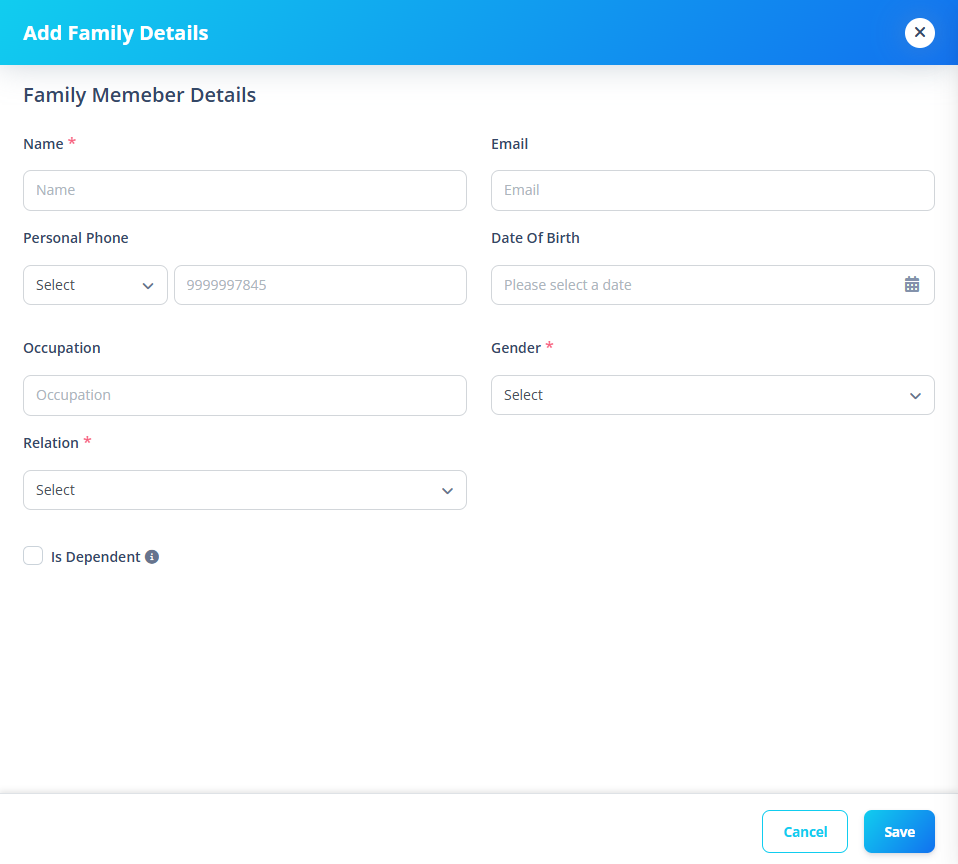
1️⃣ Basic Information
Fields
- Name (Required)
- Email (Optional)
2️⃣ Contact Information
Fields
- Phone Code
- Phone Number
Phone is optional.
If phone is entered:
- Cannot start with 0
- Must be 8–12 digits
- Phone code becomes required
3️⃣ Personal Information
Fields
- Date of Birth
- Occupation
- Gender (Required)
Date Rules
- Cannot be future date
- Uses system-configured date format
- Maximum date is today
4️⃣ Relationship Details
Fields
- Relation (Required)
- Relation Name (Required only if "Other" selected)
Relations are populated from system codes.
Conditional Logic
If selected relation is not found in system list:
- System automatically sets relation to "Other"
- Requires manual relation name
When saving:
- If relation is "Other", the custom relation name is stored
- Otherwise, predefined relation is stored
5️⃣ Dependent Status
Checkbox:
- Is Dependent
If selected:
- Marks family member as financially dependent
- May impact:
- Insurance
- Benefits
- Tax declarations
Why This Section Matters
Family Details supports:
- Insurance coverage setup
- Dependent-based tax exemptions
- Emergency contact validation
- Compliance documentation
- Benefit eligibility checks