Certification Details
The Certification Details section in VoxHRM allows employees and HR to store professional certifications and credentials.
This section is useful for:
- Skill validation
- Compliance tracking
- Audit documentation
- Promotion eligibility
Multiple certification records can be added per employee.
Section Overview
Each certification entry includes:
- Certification Information
- Issuing Authority
- Validity Dates
- Status
- Score (Optional)
- Verification Link (Optional)
- Supporting Document
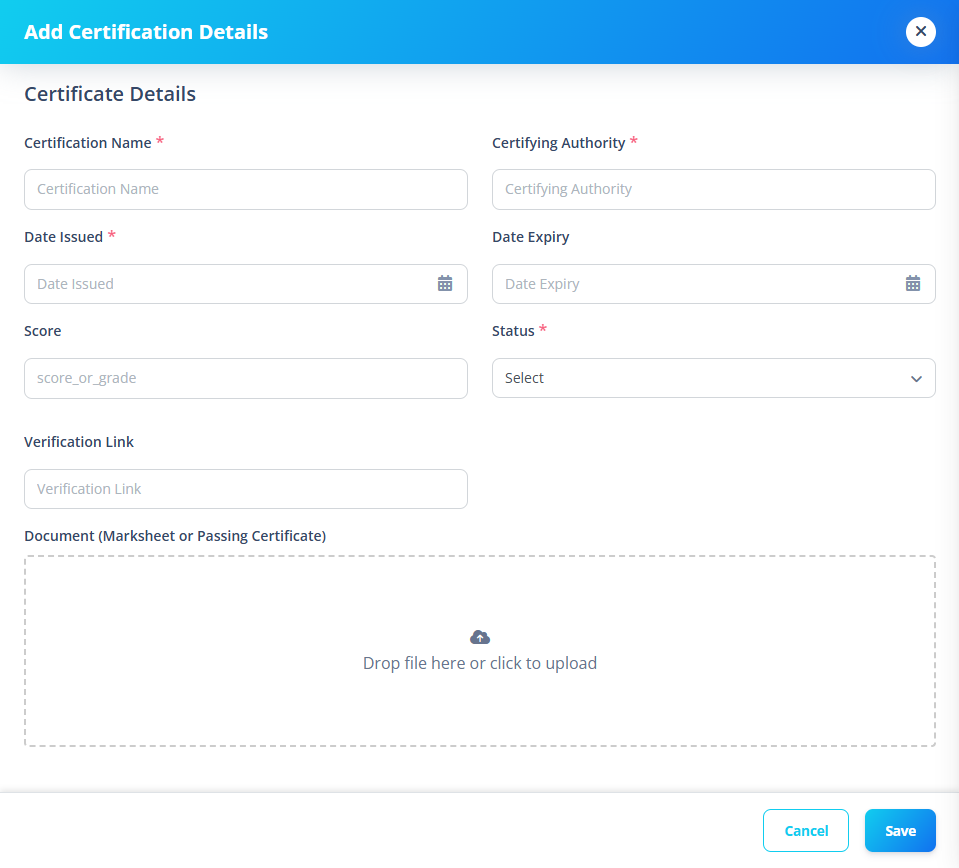
1️⃣ Certification Information
Fields
| Field | Required |
|---|---|
| Certification Name | ✅ |
| Certifying Authority | ✅ |
Examples:
- AWS Certified Developer
- PMP Certification
- Microsoft Azure Fundamentals
2️⃣ Validity Dates
Fields
| Field | Required |
|---|---|
| Date Issued | ✅ |
| Date Expiry | ❌ |
Validation Rules
- Date Issued cannot be in the future.
- Date Expiry must be greater than or equal to Date Issued.
If expiry is earlier than issue date, form submission is blocked.
3️⃣ Status
Status is selected from system-defined certificate statuses.
Examples:
- Active
- Expired
- Revoked
- Pending
4️⃣ Score
Used when certification includes grading.
Examples:
- 92%
- 8.5/10
- Pass
5️⃣ Verification Link
Stores:
- Public verification URL
- Credential validation link
- Digital badge link
6️⃣ Document Upload
Optional supporting file upload:
Examples:
- Certificate PDF
- Digital badge
- Marksheet
- Credential proof
Supported Formats
- JPG
- PNG
- JPEG
Why This Section Matters
Certification tracking is important for:
- Compliance audits
- Industry regulation
- Skill mapping
- Workforce capability tracking