Pay Group Configuration
After creating a Pay Group, configure its salary components to define the earnings and deductions that apply to employees in the group.
Think of this as the salary template for the Pay Group — when you assign an employee to this Pay Group, these components become their default salary structure.
Navigate to: Payroll → Settings → Pay Groups → [Pay Group Name] → Salary Components tab
How to Access Configuration
- Go to Payroll → Settings → Pay Groups.
- Click the Pay Group name to open the detail page.
- Click the Salary Components tab.
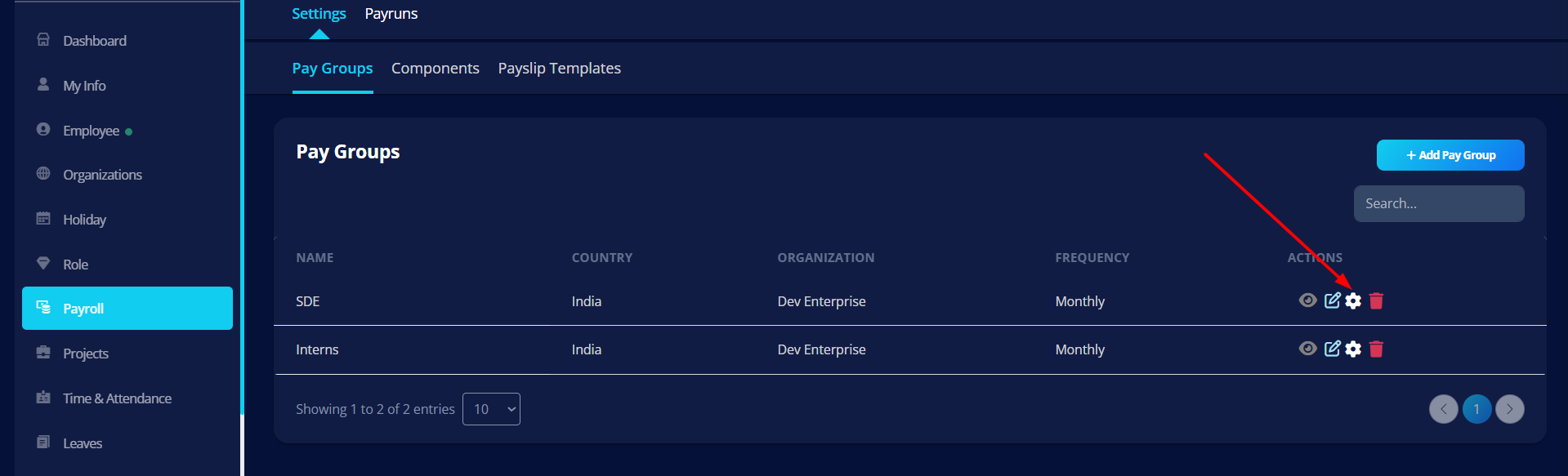
Configuration Overview
The Pay Group detail page shows:
- Pay Group Summary — Name, Legal Entity, Pay Frequency, Country
- Basic Information tab — all configured pay cycle and payrun settings
- Salary Components tab — component library for this Pay Group
Salary Components Tab
The Salary Components tab is split into four sub-tabs:
Earnings
Salary components that increase gross salary.
Examples: Basic Pay, HRA, Special Allowance, Performance Bonus
Earnings are included in the Gross Salary calculation.
Benefits
Non-direct salary additions that may affect CTC.
Examples: Employer PF Contribution, Insurance Contribution, Gratuity
Benefits may or may not impact net pay depending on configuration.
Deductions
Components that reduce salary.
Examples: Provident Fund (PF), Professional Tax, Income Tax (TDS), ESI, Loan Recovery
Deductions reduce Net Pay.
Reimbursements
Repayments for employee expenses.
Examples: Travel Reimbursement, Internet Reimbursement, Meal Reimbursement
Reimbursements are usually paid separately or added after payroll approval.
How to Attach and Configure Components
- Open the Salary Components tab on the Pay Group detail page.
- Select the relevant sub-tab: Earnings, Benefits, Deductions, or Reimbursements.
- Click the Add button. Select a component from the dropdown — the list shows all components you have already created under Payroll → Settings → Components.
- Set the Calculation Type — flat amount or percentage of gross/basic — and enter the value.
- For statutory deductions (PF, ESI, PT, LWF, TDS), additional configuration panels appear. Fill in the applicable rates, wage ceilings, and regimes.
- Ensure components are ordered from foundational to dependent. For example, Basic must appear above HRA (which is a % of Basic) so it is calculated first.
- Click Confirm after each addition.
If a component is calculated as a percentage of another component, the base component must appear higher in the list so it is calculated first. For example, if HRA = 40% of Basic, Basic must be listed above HRA. Special Allowance should always be last, as it is calculated from what remains of the CTC after all other components.
Always add Special Allowance as the last earning component. It is auto-derived as CTC minus the sum of all other components, ensuring the salary always adds up exactly to the employee's CTC.
Important Rules
- A component must be created under Payroll → Settings → Components before it can be added to a Pay Group.
- The required flow is: Create component → Attach to Pay Group → Set calculation type and amount → Save.
- Different Pay Groups can have entirely different sets of components.
- Avoid removing components from a Pay Group once a pay run has started for the current period.
How Salary Calculation Works
When payroll runs, the system processes components in this order:
- Earnings are calculated first (from top to bottom in the list order)
- Benefits are processed
- Deductions are applied
- Reimbursements are added (if applicable)
Net Pay formula:
Gross Salary + Benefits − Deductions + Reimbursements = Net Pay
Related Setup
- Salary Components — create and manage earning and deduction components
- Pay Groups — create and configure Pay Groups
- Salary Structure — assign salary structure to individual employees
Why Configuration Is Separate
Separating Pay Group creation from component configuration allows:
- Reusing components across multiple pay groups
- Country-specific payroll structures
- Different salary models for different employee categories
- Better payroll scalability
Best Practices
- Attach Basic Salary first before other percentage-based components.
- Verify deduction formulas before running payroll.
- Review component ordering if formulas depend on Gross Salary.
- Do not modify components after payroll is finalized for a cycle.